


YouCut - Video Editor & Maker
4.8133.47K Reviews
App Specs
- Version
- 1.716.1222
- Updated On
- License
- Free
- Downloads
- 100,000,000+
- Developer
- InShot Video Editor
- Categories
- Video Players & Editors
- Platform
- Android
Screenshots



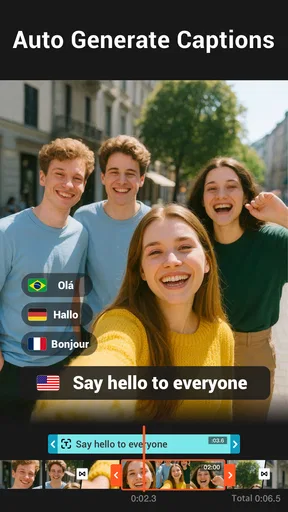
 Analysis by AppCompare
My first useful result with YouCut - Video Editor & Maker would be a short, tidy clip made from ordinary phone footage: remove the awkward start, keep the best moment, add a little music, and save a version I’m happy to share. That’s the kind of job this video-editing app is built to make approachable. It comes from InShot Video Editor, is free to install, and is rated for Everyone, so it feels aimed at casual creators as much as people who post regularly.
Getting Started with YouCut
So, first things first, downloading YouCut is a breeze. Just head over to your app store, and you’re good to go. Once you've got it installed, you’ll notice how clean and intuitive the interface is. No clutter, just the tools you need.
Features That Stand Out
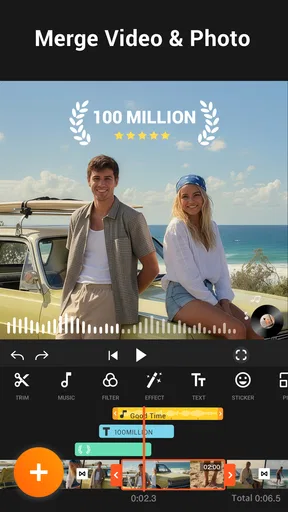
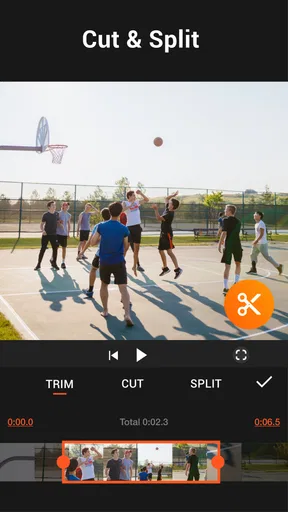
One of the things I love about YouCut is its user-friendly setup. You don’t need to be a tech wizard to navigate through it. The app comes loaded with features like trimming, cutting, and splitting your clips. Need to add some flair? You’ve got filters and effects galore. I had a blast experimenting with different looks for my videos.
Now, let’s talk about adding music. YouCut offers a decent library of background tunes, or you can import your own – super handy if you want to personalize your creations. Plus, the video speed control is a fun tool to play around with. Slow-mo or speed-up, it’s your call!
Making Your First Edit Feel Easy
For a first project, I’d choose just two or three clips rather than trying to assemble a whole camera roll. Start by trimming each clip to its useful moment, then put them in an order that tells a simple story. A quick sequence of a meal being prepared, a walk through the neighborhood, or a pet doing something funny is enough to learn the basic rhythm of the editor without getting lost in options.
One practical tip is to make the rough cut before choosing filters or music. It is easier to judge pacing when the clips are already in place, and you avoid spending time polishing a shot you later remove. If you add a soundtrack, listen through the finished sequence once before exporting: a track that sounds pleasant on its own can compete with speech or make a quiet moment feel rushed. I’d keep the first edit modest and treat effects as seasoning, not a requirement.
Small Choices That Improve the Result
When I’m editing footage for a vertical social post, I check the framing before I get attached to a particular filter. A crop can cut off a face, sign, or useful detail, and color effects won’t fix that. For a clip that may be watched with sound off, I also make sure the visuals tell the story on their own instead of relying entirely on music. These checks take little time but often matter more than stacking on extra effects.
Worth Reading Before You Choose

Baby Panda World Brings Quick Play to Modern Phones, but Its Game Library Feels Busy

ESPN’s Live Game View Makes Following Close Games Easier

QuizzLand Review: A Good Fit for Short Trivia Breaks, Not Every Player

Basketball Stars: Multiplayer Is Fast, but Can It Recover When Matches Go Wrong?

WEBTOON Turns Phone Updates Into a Better Reading Routine

Link to Windows Runs on Shared Habits, Not Social Feeds
Speed changes are best used with a clear purpose. A brief slow-down can draw attention to one moment, while speeding up a long stretch can keep a short video moving; applying either to everything can make the result feel gimmicky. I’d save a clean version before experimenting if I’m unsure which direction works, and compare the two by watching them from beginning to end rather than judging individual shots in isolation.
Why It’s Worth Downloading
If you’re like me and enjoy sharing your creations online, YouCut makes it easy to export your videos in HD. No watermarks, which is a huge plus. The app supports various formats, so compatibility is never an issue.
I also appreciate the lack of pesky ads. We all know how annoying it can be when ads interrupt your creative flow, right? With YouCut, that’s one less thing to worry about.
Another cool thing? It’s lightweight. It doesn’t hog your device’s resources, so even if you’re working on an older phone, you’re not going to face any lag.
Where It Fits Among Video Editors
Compared with a full desktop editor, YouCut is more comfortable for quick edits on a phone than for a project that needs fine control over many layers, detailed sound mixing, or a tightly managed production workflow. That trade-off is useful rather than a flaw if your goal is a clear social clip, a family montage, or a simple slideshow without moving footage to a computer. If you need frame-by-frame precision or a complex multi-track project, I’d choose a more advanced editor instead.
It also sits in a different lane from apps that focus mainly on templates: YouCut gives you room to make straightforward cuts and shape the pace yourself, which can be better when you already know what moments you want to keep. The flip side is that a blank project asks you to make those decisions. If you want an app to do most of the arranging for you, a template-led option may feel faster; if you want a little control without a steep learning curve, this is a sensible middle ground.
Everyday Use, Costs, and Compatibility
A realistic use for me would be recording a few moments during a weekend outing, then making a short recap while the details are still fresh. I’d cut out pocket footage, keep a couple of highlights, and add music only if it suits the mood. For a small shop or community group, the same workflow can turn phone clips into a simple announcement; for someone who wants polished campaign videos with exact brand and audio control, I’d recommend a more specialised tool.
The app is free, with optional in-app purchases priced from $2.99 to $49.99 per item. I’d begin with the free editing workflow and only consider a purchase if I run into a specific feature or usage need that justifies it. It has a 4.8 average from around 8.3 million ratings, and has passed 100 million installs, which suggests it has found a large audience, though popularity alone doesn’t guarantee it will suit your style.
On the technical side, version 1.702.1215 requires Android 8.0 or later. If you’re using an older device, check that requirement before planning a project. For a long edit, I’d also keep the source clips available until I’ve watched the exported file all the way through; that simple check catches a missed trim or an awkward transition before I share it.
When I’d Choose Something Else
YouCut is a good fit if you want to trim, combine, and give phone footage a bit of polish without learning a complicated editing system. It’s especially approachable for a first project because the useful actions are familiar: select clips, cut away the excess, add a finishing touch, and export. It is less compelling if your work depends on elaborate timelines, detailed audio adjustments, or a highly repeatable professional process. In those cases, the extra depth of a more advanced editor is worth the learning curve.
I’d also skip it if what you really want is a one-tap result and you don’t want to make choices about order, pacing, or music. The app can simplify editing, but the final shape still comes from your decisions. That’s a fair exchange: it gives beginners room to learn by doing, though it won’t replace an automatic highlight maker for someone who wants almost no hands-on work.
Final Thoughts
In a world where there’s no shortage of video editing apps, YouCut - Video Editor & Maker stands out for its simplicity and functionality. Whether you’re a newbie or a seasoned editor, it’s got something for everyone. So, if you’re looking to up your video editing game without breaking the bank or your brain, give YouCut a shot. Trust me, it’s worth the download.
Pros
- Intuitive interface for easy editing.
- Wide variety of filters and effects.
- No watermark in the free version.
- Supports multiple video formats.
- Fast rendering with high quality output.
Cons
- Limited advanced editing tools.
- Occasional in-app ads.
- Requires internet for some features.
- No multi-track timeline.
- Limited audio editing options.
FAQs for YouCut - Video Editor & Maker
What features does YouCut - Video Editor & Maker offer for video editing?
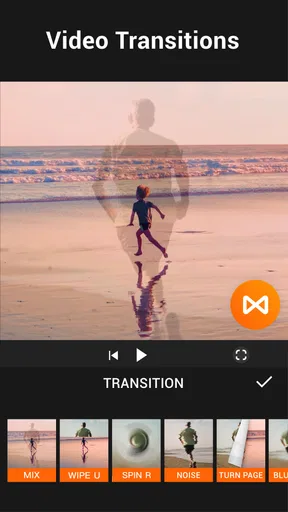
YouCut provides a comprehensive suite of video editing tools, including trimming, cutting, and merging clips. It offers a variety of filters, effects, and transitions to enhance videos. Users can add music, adjust video speed, and utilize advanced editing features like picture-in-picture and text overlays, making it a versatile tool for both beginners and experienced editors.
Is YouCut - Video Editor & Maker free to use, and are there any in-app purchases?
YouCut is free to download and use, offering a range of basic editing features at no cost. However, there are in-app purchases available for users who wish to access premium features, such as advanced editing tools and the removal of ads. This allows users to choose the level of functionality that suits their needs.
Does YouCut - Video Editor & Maker support different video formats?
Yes, YouCut supports a variety of video formats, ensuring compatibility with most video files you might work with. Whether you're editing footage from a smartphone or a more professional camera, YouCut's robust format support helps ensure a smooth editing process, making it convenient for users with diverse video editing requirements.
Can I share videos directly from YouCut to social media platforms?
Absolutely! YouCut allows users to export and share their edited videos directly to popular social media platforms like YouTube, Instagram, and Facebook. This feature makes it easy to showcase your creative work with friends, family, and followers, streamlining the process of sharing content online.
Does YouCut - Video Editor & Maker require a lot of storage space on my device?
YouCut is designed to be efficient with storage, ensuring it doesn’t occupy excessive space on your device. While the app itself is lightweight, the amount of space required will largely depend on the size and quality of the videos you edit and save. It’s advisable to keep an eye on your storage space, especially when working with high-resolution footage.


